Can the Same User Enter a Adobe Journey Multiple Times?

Can the Same User Enter an Adobe Journey Optimizer Journey Multiple Times? A Beginner’s Guide with Real-World Scenarios
Imagine this.
You are running an online electronics store.
A customer named Ravi visits your website and adds a smartphone to his cart. He gets distracted by a phone call and leaves without completing the purchase.
Adobe Journey Optimizer (AJO) detects the cart abandonment event and immediately places Ravi into a Cart Recovery Journey.
A reminder email is sent.
A push notification follows a few hours later.
The next day Ravi returns and purchases the phone.
Success!
But two weeks later Ravi visits again.
This time he adds a pair of wireless earbuds to his cart and leaves without buying.
Now a question appears:
Can Ravi Enter the Same Cart Recovery Journey Again?
Many beginners assume the answer is either a simple "yes" or "no."
In reality, the answer depends entirely on how the journey is configured.
Understanding journey re-entry is one of the most important concepts in Adobe Journey Optimizer because it directly affects customer experience, engagement, and business results.
A poorly configured journey can either:
- Spam customers repeatedly
- Prevent customers from receiving important communications
- Create duplicate experiences
- Reduce trust in your brand
A properly configured journey can deliver highly relevant experiences every time customer behavior changes.
In this article, we will explore:
- What journey re-entry means
- How Adobe Journey Optimizer handles re-entry
- Real-world examples
- Best practices
- Common beginner mistakes
- When to allow multiple entries
- When to prevent them
Understanding Journey Entry
Before discussing re-entry, we need to understand what happens when someone enters a journey.
A journey starts when a triggering event occurs.
Examples include:
- Cart abandonment
- Product purchase
- Registration completion
- Mobile app installation
- Loyalty point redemption
- Subscription expiration
When the event occurs, AJO evaluates the customer against journey conditions.
If all conditions are satisfied, the customer enters the journey.
Think of a journey like entering a building.
Every time a person walks through the entrance door, AJO decides:
"Should this person be allowed inside?"
The answer depends on journey configuration.
Types of Journeys in Adobe Journey Optimizer (AJO)
Adobe Journey Optimizer gives marketers different ways to design customer journeys depending on how and when they want to engage users. Instead of a one-size-fits-all approach, AJO supports multiple journey types based on real-time events, audience data, and scheduled execution.
Let’s break them down in a simple, practical way.
1. Unitary Event Journeys (Real-Time Personal Journeys)
Unitary event journeys are the most real-time and personalized type of journeys in AJO. They start the moment a specific action from a single customer is detected.
Think of it as: “One customer triggers one journey instantly.”
How it works
- A customer performs an action like adding a product to cart or placing an order
- That event immediately triggers the journey
- Only that specific customer enters the journey
Example
- A customer abandons a shopping cart
- A reminder journey starts immediately for that customer
- They receive follow-up emails or offers based on behavior
These journeys are ideal when timing matters and you want to react instantly to user behavior.
2. Business Event Journeys (Event-Driven Audience Journeys)
Business event journeys are designed for scenarios where a business-level event impacts multiple users at once.
Think of it as: “One event triggers journeys for many customers.”
How it works
- A business event occurs (like a product launch or outage alert)
- A target audience is identified
- All matching users are injected into the journey
Example
- A new product is launched
- All interested or eligible customers are selected
- Each customer receives personalized messaging through the journey
This type is powerful for coordinated campaigns that need to reach multiple users at the same time.
3. Read Audience Journeys (Scheduled or Batch Journeys)
Read audience journeys work on predefined customer groups (audiences). Instead of waiting for an event, they pull users from an audience when the journey runs.
Think of it as: “Let’s process a list of customers together.”
How it works
- An audience is selected (like “inactive users” or “premium customers”)
- The journey runs either once or on a schedule
- All users in the audience enter the journey
Example
- A weekly campaign targets inactive users
- Every Monday, the journey pulls the latest audience list
- Messages are sent based on engagement strategy
These journeys are perfect for scheduled marketing campaigns and batch communications.
4. Audience Qualification Journeys (Lifecycle-Based Journeys)
Audience qualification journeys are triggered when a customer enters or exits an audience in real time.
Think of it as: “When a customer’s status changes, react immediately.”
How it works
- A customer is added to or removed from an audience
- The journey reacts instantly to that change
- The user moves through the journey automatically
Example
- A customer becomes a VIP member
- They immediately enter a VIP onboarding journey
- Or if they become inactive, they enter a win-back journey
This journey type is very useful for lifecycle marketing and real-time segmentation strategies.
Key Takeaway
- Unitary Event Journeys: Triggered by a single customer action in real time
- Business Event Journeys: Triggered by a business event affecting multiple users
- Read Audience Journeys: Batch-based journeys using scheduled audience lists
- Audience Qualification Journeys: Triggered when users enter or exit audiences
Together, these journey types give marketers complete flexibility to design experiences based on real-time behavior, scheduled campaigns, or lifecycle changes.
Re-entrance Behavior Across Journey Types in Adobe Journey Optimizer
In Adobe Journey Optimizer, re-entrance rules are not the same for all journey types. Depending on whether the journey is event-driven, audience-based, or batch-based, the system handles repeated entries differently.
1. Unitary Event & Audience Qualification Journeys
Source: Adobe Journey Optimizer Documentation
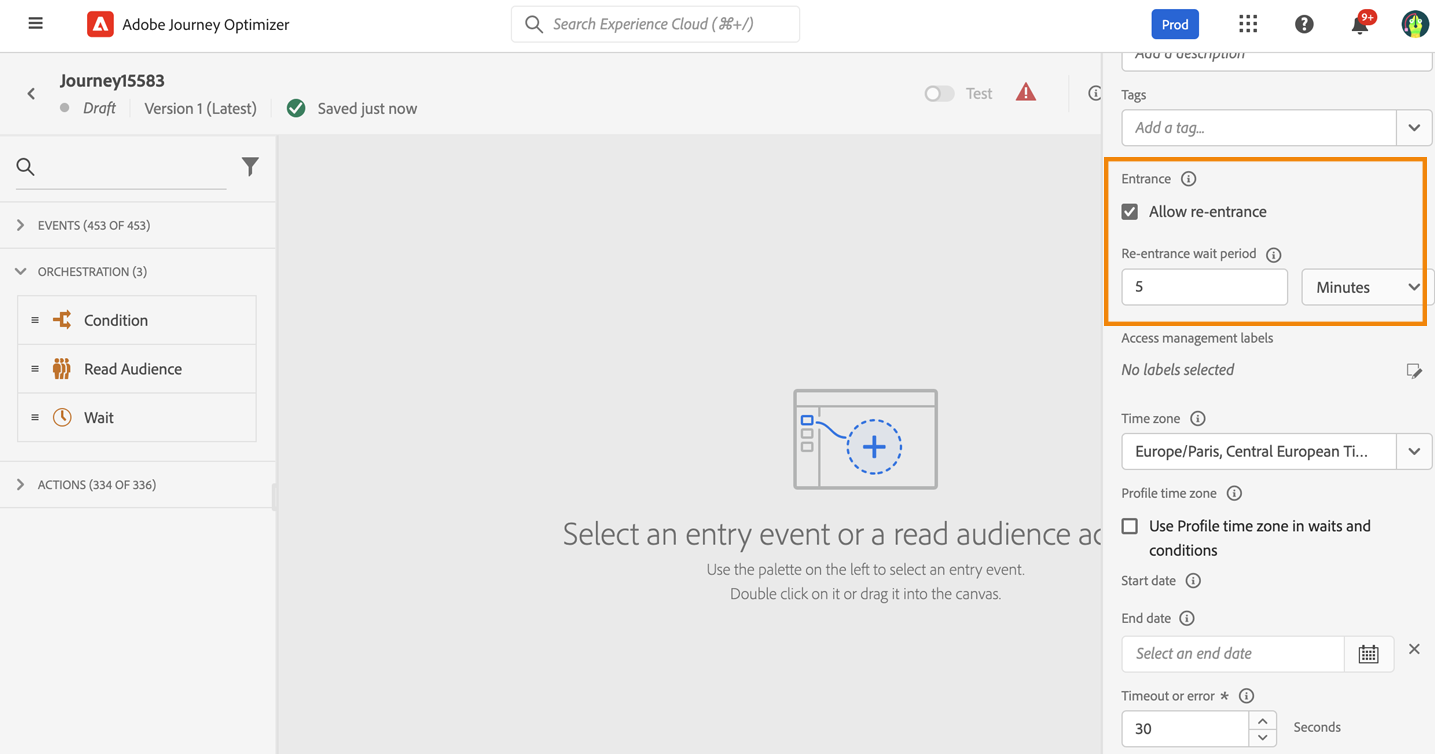
These journeys are designed to react to real-time customer behavior or audience changes. Because of this, Adobe provides flexible re-entrance controls.
Re-entrance behavior
- If re-entrance is enabled: A profile can enter the journey multiple times, but only after fully exiting the previous journey instance.
- If re-entrance is disabled: The profile cannot re-enter the same journey within the global journey timeout period.
Default behavior
- Re-entrance is enabled by default in most journeys
- A default re-entrance wait period of 5 minutes is applied
- This prevents accidental duplicate triggering from repeated events
Key insight
Even after the wait period expires, re-entry can still be controlled using additional conditions (like profile attributes or audience membership) if you want stricter control.
2. Business Event Journeys
Source: Adobe Journey Optimizer Documentation
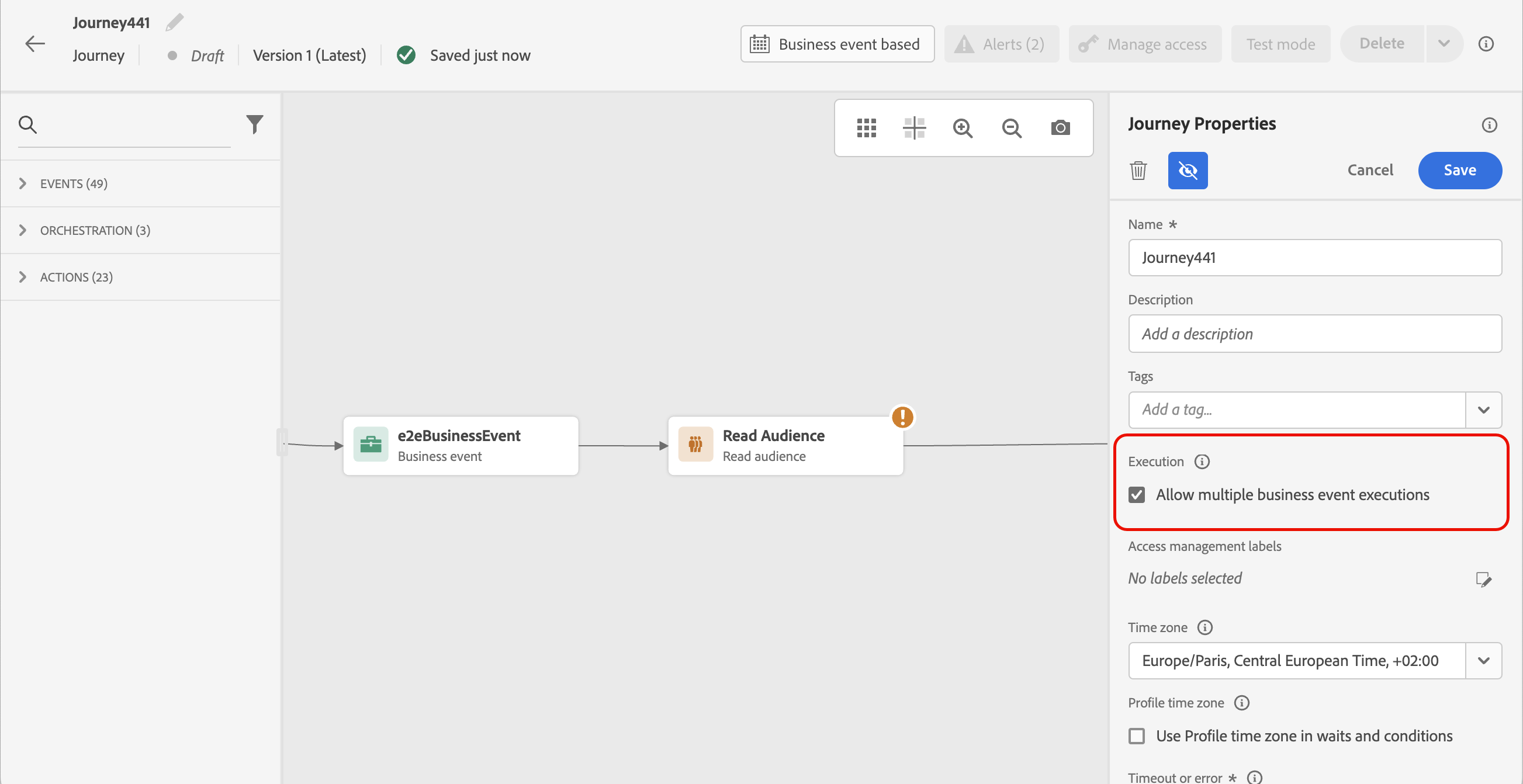
Business event journeys behave differently because they are designed to handle large-scale, event-driven campaigns where multiple users may be impacted at the same time.
Re-entrance behavior
- To allow multiple executions of the same business event, you must explicitly enable execution in journey settings
- A single profile can exist multiple times in the same journey at the same time
- Each instance is tied to a different business event occurrence
Important concept
Adobe reuses audience data for up to 1 hour after the first execution, ensuring consistency across event processing during that window.
Key insight
Unlike unitary journeys, business journeys are designed to support parallel processing of multiple event instances for the same profile.
3. Read Audience Journeys
Read audience journeys work differently because they are based on batch or scheduled audience evaluation instead of real-time events.
Re-entrance behavior
- One-shot journeys: A profile enters only once and cannot re-enter again
- Recurring journeys: All audience members enter each time the journey runs
- However, profiles must complete the current journey before entering the next run
Key insight
Recurring journeys continuously re-evaluate audiences, but ensure a profile does not overlap multiple instances of the same journey at the same time.
Overall Key Takeaways
- Unitary & Audience Qualification Journeys: Controlled re-entrance with wait period and timeout rules
- Business Event Journeys: Can support multiple parallel entries for the same profile based on different events
- Read Audience Journeys: Follow batch execution logic with one-shot or recurring behavior
- Default safety mechanism: 5-minute re-entrance wait period prevents accidental duplicate triggers
In short, Adobe Journey Optimizer adjusts re-entrance logic based on how the journey is triggered—real-time events, business processes, or scheduled audience runs.
What is Journey Re-Entry?
Journey re-entry simply means:
A customer who previously entered a journey enters the same journey again after another qualifying event occurs.
For example:
Day 1
Ravi abandons Cart A.
Journey starts.
Day 10
Ravi abandons Cart B.
Can he enter again?
That is a re-entry scenario.
Re-entry Options in Adobe Journey Optimizer
1. Allow Re-entry Anytime
A profile can enter the journey every time the entry event occurs.
Example:
- Journey starts when a customer abandons a cart.
- Customer abandons a cart on Monday → enters journey.
- Customer abandons another cart on Thursday → enters journey again.
This is useful for:
- Cart abandonment journeys
- Product browse abandonment journeys
- Transactional event journeys
2. Do Not Allow Re-entry
A profile can enter the journey only once.
Example:
- Welcome Journey for new customers.
- Customer signs up and enters the journey.
- Even if the signup event is sent again, they cannot enter the journey a second time.
This is commonly used for:
- Welcome series
- Onboarding journeys
- One-time compliance communications
3. Allow Re-entry After Exit
A profile can enter again only after completing or exiting the previous journey instance.
Example:
- Customer enters a loyalty nurture journey.
- While still active in the journey, another trigger occurs.
- Adobe Journey Optimizer blocks the second entry.
- After the customer exits the journey, the next trigger can start a new journey instance.
This prevents multiple parallel journey instances for the same customer, helping maintain a consistent customer experience.
Understanding Re-entrance in Adobe Journey Optimizer (AJO)
Adobe Journey Optimizer allows you to control whether a profile can enter the same journey multiple times. The behavior depends on whether re-entrance is enabled or disabled.
1. Re-entrance Enabled
If re-entrance is enabled, a profile can enter the same journey multiple times. However, the profile must completely exit the current journey instance before entering again.
What does this mean?
- A profile enters the journey.
- While the profile is still active in the journey, any new qualifying event is ignored.
- Once the profile exits the journey, a future qualifying event can trigger a new journey entry.
Example: Cart Abandonment Journey
- Day 1: John abandons a cart and enters the journey.
- Day 2: John abandons another cart while still in the journey.
- Result: The second entry is blocked because John is already participating in the journey.
- Day 3: John completes the journey and exits.
- Day 4: John abandons another cart.
- Result: John can enter the journey again.
Timeline
Day 1  → Enter Journey

Day 2  → New Event Occurs
         Entry Blocked (Already in Journey)

Day 3  → Journey Ends

Day 4  → New Event Occurs
         Entry Allowed
2. Re-entrance Disabled
If re-entrance is disabled, a profile cannot enter the same journey multiple times during the configured Global Journey Timeout period.
Even if the profile exits the journey early, Adobe Journey Optimizer still prevents re-entry until the timeout period expires.
Example: Welcome Journey
Journey Timeout = 30 Days
- Day 1: Sarah signs up and enters the Welcome Journey.
- Day 5: The journey completes and Sarah exits.
- Day 10: The signup event is triggered again.
- Result: Entry is blocked.
- Day 20: Event occurs again.
- Result: Entry is still blocked.
- Day 31: Timeout period has expired.
- Result: Sarah can enter the journey again if the event occurs.
Timeline
Journey Timeout = 30 Days

Day 1  → Enter Journey

Day 5  → Journey Ends

Day 10 → New Event Occurs
         Entry Blocked

Day 20 → New Event Occurs
         Entry Blocked

Day 31 → New Event Occurs
         Entry Allowed
What is Global Journey Timeout?
The Global Journey Timeout is the maximum amount of time Adobe Journey Optimizer keeps a profile associated with a journey.
When re-entrance is disabled, the profile cannot enter the journey again until this timeout period expires, regardless of whether the journey ended earlier.
Journey Timeout = 30 Days

Entered Journey → Day 1

Re-entry Allowed → Day 31
Comparison: Re-entrance Enabled vs Disabled
| Scenario | Re-entrance Enabled | Re-entrance Disabled |
|---|---|---|
| Profile enters journey | ✅ Allowed | ✅ Allowed |
| Event occurs while profile is still in journey | ❌ Blocked | ❌ Blocked |
| Profile exits journey | ✅ Can re-enter | ❌ Still blocked |
| Must wait for timeout period? | ❌ No | ✅ Yes |
| Common use cases | Cart Abandonment, Browse Abandonment | Welcome Journeys, Onboarding Journeys |
Key Takeaway
Re-entrance Enabled: A profile can enter the journey multiple times, but only after exiting the current journey instance.
Re-entrance Disabled: A profile cannot enter the journey again until the configured Global Journey Timeout period expires, even if the profile has already exited the journey.
This is why cart abandonment journeys typically enable re-entrance, while welcome and onboarding journeys usually disable it.
Why Re-Entry Matters
Many customer behaviors are repetitive.
Customers:
- Browse repeatedly
- Abandon multiple carts
- Purchase multiple products
- Renew subscriptions annually
- Visit websites frequently
If journeys only allowed a single entry forever, marketing automation would become almost useless.
Customers need personalized experiences every time meaningful behavior occurs.
However, unlimited entries can also become dangerous.
Imagine receiving:
- 10 cart reminders
- 15 discount offers
- 20 abandoned browse emails
within a few days.
Customers would quickly unsubscribe.
This is why re-entry configuration is so important.
Real-World Story: The Online Fashion Store
Let's imagine a fashion retailer.
A customer named Priya shops regularly.
January
Priya abandons a dress.
Cart Recovery Journey starts.
She receives:
- Email reminder
- Push notification
- Discount offer
Eventually she purchases.
Journey ends.
February
Priya abandons shoes.
The same cart recovery event occurs again.
Should she receive recovery messages?
Absolutely.
This is a completely new shopping intent.
Preventing re-entry would mean losing a valuable sales opportunity.
This is a classic example where multiple entries make perfect business sense.
Types of Journey Re-Entry Scenarios
Scenario 1: Re-Entry Allowed
Best for:
- Cart abandonment
- Browse abandonment
- Product interest journeys
- Event registrations
- Product recommendation journeys
Example:
Customer abandons cart.
Journey runs.
Customer abandons another cart later.
Journey starts again.
Each abandonment is treated as a new opportunity.
Scenario 2: Re-Entry Restricted
Best for:
- Welcome journeys
- New customer onboarding
- First purchase journeys
- Account creation journeys
Example:
A customer creates an account.
Welcome Journey starts.
The customer already has an account.
The journey should never start again.
Sending the same welcome series repeatedly would create confusion.
Scenario 3: Controlled Re-Entry
Sometimes businesses want something in between.
Example:
A customer can re-enter only after 30 days.
This prevents excessive messaging while still allowing future engagement.
Think of it as a cooling-off period.
How Adobe Journey Optimizer Handles Re-Entry
One of the biggest beginner misconceptions is:
"If an event occurs again, the customer automatically enters again."
Not necessarily.
AJO evaluates several factors:
- Journey configuration
- Entry conditions
- Profile state
- Active participation
- Exit conditions
- Frequency controls
The final behavior depends on how the journey was designed.
This is why journey architects must carefully plan entry and re-entry logic before publishing.
A Cart Abandonment Example

Let's build a simple journey.
Trigger: Cart Abandonment Event
Flow:
- Wait 1 hour
- Send reminder email
- Wait 24 hours
- Send push notification
- Exit
Now imagine:
Monday: Customer abandons Cart #1
Tuesday: Customer abandons Cart #2
Journey #2 may also start depending on re-entry settings.
Without proper controls the customer could receive:
- Email for Cart #1
- Email for Cart #2
- Push for Cart #1
- Push for Cart #2
This may create message fatigue.
Real Business Problems Caused by Improper Re-entry Settings
At first, allowing customers to re-enter the same journey multiple times may seem harmless. But in real-world marketing campaigns, poor re-entry control can create serious customer experience problems.
Imagine a customer abandoning multiple carts within a few days. Without proper re-entry settings, the customer may receive repeated emails, push notifications, SMS messages, or offers from the same journey again and again.
This can lead to several business problems:
Customer Unsubscribes
If customers receive too many reminder emails in a short time, they may become frustrated and unsubscribe from marketing communications completely.
Example:
- Cart Reminder #1
- Discount Reminder #2
- Final Offer Reminder #3
all within two days for different abandoned carts.
Instead of encouraging a purchase, the brand loses the subscriber entirely.
Push Notification Opt-Out
Mobile users are highly sensitive to excessive push notifications. Repeated journey re-entries can cause customers to disable app notifications permanently.
Once push permission is lost, future engagement opportunities also disappear.
Brand Irritation
Customers may feel the brand is “spamming” them or tracking them too aggressively.
For example:
A customer casually browses products multiple times but receives reminders every single time. Overcommunication can create a negative brand impression instead of building trust.
Spam Complaints
Too many repeated emails may cause users to mark messages as spam.
This is dangerous because spam complaints can affect:
- Email deliverability
- Sender reputation
- Inbox placement rates
Even important campaigns may later start landing in spam folders.
Lower Conversion Rates
Sending too many reminders does not always increase sales.
In many cases:
- Customers ignore notifications
- Engagement rates drop
- Open rates decrease
- Click-through rates become weaker
This is called notification fatigue or communication fatigue.
Channel Suppression Risks
Some organizations implement channel suppression policies to protect customer experience.
If journeys continuously re-enter without proper controls:
- Customers may automatically move into suppression audiences
- Future campaigns may stop targeting them
- Marketing reach gets reduced
This directly impacts long-term customer engagement.
Why Re-entry Settings Matter
This is why Adobe Journey Optimizer provides re-entry controls, timeout settings, and journey guardrails.
A properly designed journey should:
- Balance engagement and customer experience
- Avoid duplicate communication
- Respect communication frequency
- Deliver relevant messages at the right time
Good journey design is not just about sending messages — it is about sending them responsibly.
Re-entry vs Concurrent Journeys — The Most Confusing AJO Concept
One of the biggest beginner confusions in Adobe Journey Optimizer is this:
“If a user cannot re-enter a journey, does that mean they also cannot enter other journeys?”
The answer is No.
These are two completely different concepts.
Many freshers think:
- Re-entering the SAME journey
- Entering DIFFERENT journeys simultaneously
are identical behaviors.
But AJO treats them separately.
1. Re-entering the SAME Journey
This is controlled by the Journey Re-entry Settings inside the journey properties.
Example:
- Cart Abandonment Journey
A customer enters the journey after abandoning a cart.
Inside the journey settings:
- Re-entry = Disabled
Now imagine:
- Customer abandons another cart again after 10 minutes.
Even though the event happened again:
❌ The customer CANNOT enter the same journey again.
Because AJO says:
“This profile is already part of this journey instance.”
This is called:
Re-entering the SAME journey
2. Concurrent Journeys (Different Journeys Running Together)
Now let’s change the scenario.
The same customer is already inside:
- Cart Abandonment Journey
At the same time, the customer also:
- Becomes a loyalty member
- Opens the mobile app
- Makes a purchase
These actions may qualify the customer for:
- Loyalty Welcome Journey
- Mobile Push Journey
- Post-Purchase Journey
Even if re-entry is disabled in the Cart Journey:
✅ The customer can STILL enter these OTHER journeys simultaneously.
Why?
Because AJO blocks only:
- Re-entering the SAME journey
It does NOT block:
- Entering DIFFERENT journeys in parallel
This is called:
Concurrent Journey Execution
Simple Real-Time Analogy
Think of journeys like rooms inside a building.
Re-entry Problem
A customer is already inside:
- Room A → Cart Journey
If Room A says:
“No re-entry allowed”
then the customer cannot enter Room A again until they exit.
BUT…
Concurrent Journey Scenario
The same customer can still walk into:
- Room B → Loyalty Journey
- Room C → Offer Journey
- Room D → Post Purchase Journey
all at the same time.
| Scenario | Allowed? |
|---|---|
| Enter SAME journey again | Depends on re-entry settings |
| Enter DIFFERENT journeys simultaneously | Usually YES |
The Important Beginner Understanding
Here is the golden rule:
Re-entry settings are journey-specific, not profile-global.
Meaning:
A profile may be blocked from:
- entering Journey A again
while still being fully eligible for:
- Journey B
- Journey C
- Journey D
at the same time.
This is the exact reason customers often receive:
- an abandoned cart email,
- a loyalty email,
- and a promotional push notification
all on the same day.
Real Business Scenario
Imagine an e-commerce customer named Sarah.
Current Situation
Sarah is already inside:
- Cart Abandonment Journey
Re-entry is disabled.
Later the same day:
- She joins the loyalty program
- She purchases shoes
- She opens the mobile app
Now AJO may place her into:
- Loyalty Welcome Journey
- Post Purchase Journey
- Push Engagement Journey
simultaneously.
But if she abandons another cart again:
❌ She still cannot re-enter the SAME cart journey.
This perfectly explains:
Re-entry ≠ Concurrent Journey Participation
Why This Matters in Real Projects
If marketers misunderstand this concept, they may accidentally:
- overload customers with messages,
- create journey conflicts,
- or assume re-entry settings control all communications.
But in reality:
Re-entry settings only govern:
- that specific journey.
Cross-journey communication control requires:
- suppression rules,
- audience exclusions,
- priority management,
- frequency caps,
- or conflict policies.
The Golden Rule
The most successful Adobe Journey Optimizer implementations follow one principle:
Design journeys around customer behavior, not around system capabilities.
Just because AJO can allow multiple entries doesn't mean it always should.
Just because a journey can block re-entry doesn't mean it always should.
Every decision should answer one question:
Will this improve the customer experience?
If the answer is yes, you are moving in the right direction.
So, can the same user enter a journey multiple times in Adobe Journey Optimizer?
Yes, depending on how the journey is designed and configured.
Some journeys should allow re-entry because customer behavior naturally repeats.
- Cart abandonment
- Browse abandonment
- Subscription renewals
- Product recommendations
Other journeys should restrict re-entry because they represent one-time lifecycle events.
- Welcome journeys
- Account creation onboarding
- First-time customer education
The real goal is not deciding whether re-entry is technically possible.
The real goal is designing experiences that remain relevant, timely, and customer-friendly.
Remember:
A customer doesn't care how sophisticated your journey is. They care whether the message helps them at that moment.
When re-entry logic is designed thoughtfully, Adobe Journey Optimizer becomes more than a marketing tool—it becomes a platform for delivering meaningful customer experiences every time behavior changes.


Comments
Post a Comment